

createColSphere
Shared
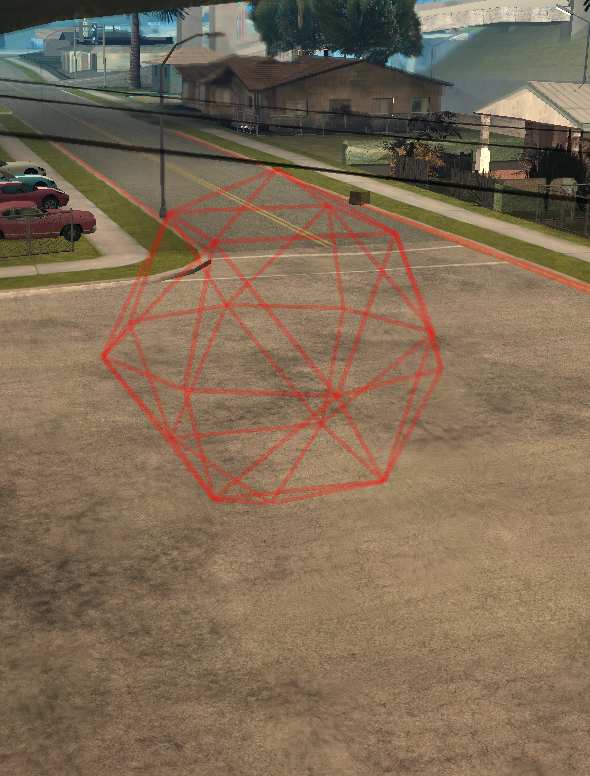
This function creates a collision sphere. This is a shape that has a position and a radius. See Wikipedia for a definition of a sphere.
Tip
To visualize a colshape when writing scripts, use the client console command showcol.
OOP Syntax Help! I don't understand this!
- Method: ColShape . Sphere(...)
Syntax
colshape|false createColSphere ( float fX, float fY, float fZ, float fRadius )Required arguments
- fX: The collision sphere's center point's X axis position.
- fY: The collision sphere's center point's Y axis position.
- fZ: The collision sphere's center point's Z axis position.
- fRadius: The collision sphere's radius.
Returns
Returns a colshape element if successful, false if invalid arguments were passed to the function.
- colshape|false: col-sphere
Code Examples
server
Example 1:This example displays a chat message when a player enters the colshape and allows the colshape to be created using a console command set_zone.
local theZone
local function shapeHit(hitElement, matchingDimensions)    if (hitElement and getElementType(hitElement) == 'player' and matchingDimensions) then        outputChatBox(getPlayerName(thePlayer).. " is in the zone!")    endend
function setZone(playerSource, commandName, fX, fY, fZ, fRadius) local fX, fY, fZ, fRadius = tonumber(fX), tonumber(fY), tonumber(fZ), tonumber(fRadius) if (not fX) or (not fY) or (not fZ) or (not fRadius) then outputChatBox("Syntax: /"..commandName.." [X] [Y] [Z] [Radius]", playerSource) else if (theZone) then destroyElement(theZone) end local tempCol = createColSphere(fX, fY, fZ, fRadius) addEventHandler("onColShapeHit", tempCol, shapeHit) outputChatBox("Zone has "..(theZone ~= nil and "moved" or "created").."!", playerSource) theZone = tempCol endendaddCommandHandler("set_zone", setZone, false, false)Gallery
Click on the image to view the full preview along with the description.
See Also
Colshape Functions
- addColPolygonPoint
- createColCircle
- createColCuboid
- createColPolygon
- createColRectangle
- createColSphere
- createColTube
- getColPolygonHeight
- getColPolygonPointPosition
- getColPolygonPoints
- getColShapeRadius
- getColShapeSize
- getColShapeType
- isInsideColShape
- removeColPolygonPoint
- setColPolygonHeight
- setColPolygonPointPosition
- setColShapeRadius
- setColShapeSize